
Answer
PowerView automated window treatments provide scheduled shade adjustments and remote control. These systems also connect with smart home setups, improving comfort and privacy within a home.
Hunter Douglas PowerView Automation systems work with more than 15 window treatment designs. They integrate with voice commands and allow for daily scheduling, enabling automatic adjustments throughout the day. DM Interiors assists homeowners with selecting and installing these systems, which feature cordless designs for child and pet safety.
Overview
PowerView automated window treatments improve daily routines with scheduled light control, better privacy, and simple use. This content covers different features and options for adding automation to any home. It presents a real-world example featuring Sarah’s experience, offering suggestions tailored to her home’s requirements.
- Smart Home: Learn how automated window treatments add to smart home comfort.
- Effortless Control: Information on control options for window coverings.
- App Features: Details on PowerView app features that support smart living.
- Choosing Shades: Advice on selecting PowerView shades for your space.
- Installation Options: A look at installation methods for PowerView systems.
- Real-World Example: DM Interiors assists with PowerView systems for residential projects.
Automated Window Treatments: Smart Home Comfort
Smart window coverings give modern homes precise control over natural light and privacy. PowerView automated window treatments connect with smart home systems, enabling scheduled adjustments throughout the day. This capability helps residents control indoor temperatures and lower energy use. For example, shades can block strong sunlight when rooms are empty or open to allow passive solar heating during cooler months.
These systems simplify daily routines by integrating with voice assistants or the PowerView App, making window covering adjustments easy. DM Interiors assists clients with integrating these systems, providing options that meet specific needs for light management and home automation. Selecting automated window treatments means simple adjustments, whether from a remote, a smart device, or through pre-set schedules, creating a more comfortable living space.
Effortless Control of Your Window Treatments
Hunter Douglas PowerView Automation systems provide several options for operating window coverings, moving past traditional manual cords. Users adjust shades with a dedicated remote, a smartphone application, or spoken commands. These adaptable control methods help homeowners manage light and privacy throughout the day.
Each control method offers specific advantages, depending on user preference and daily routines. Remote controls allow for quick adjustments, while the app enables scheduling and scene creation. Voice commands connect with existing smart home systems for hands-free operation. DM Interiors assists clients in integrating these choices into their homes, ensuring compatibility and ease of use for their automated window treatments.
Selecting a control method often depends on how a household interacts with its environment. For example, a homeowner preferring simple, immediate adjustments may choose a remote. Those prioritizing automated schedules might rely on the app. Considering daily habits helps select the most convenient option for each window treatment, ensuring maximum convenience and satisfaction.
| Control Method | Benefits |
|---|---|
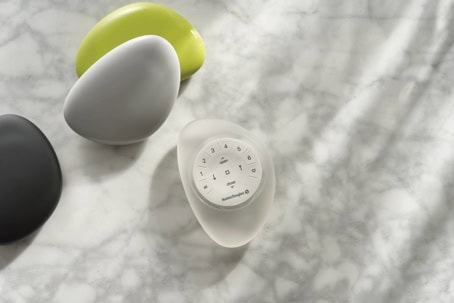
| PowerView Pebble Remote | Offers simple, handheld control for individual shades or groups. Its ergonomic design fits easily into any living space. |
| PowerView App | Allows for precise scheduling, scene creation, and remote access from a smartphone or tablet. Adjustments are possible even when away from home. |
| Voice Commands | Integrates with popular smart home assistants, enabling hands-free operation. Users can open or close shades using simple spoken instructions. |
PowerView App Features for Smart Living
The PowerView App gives homeowners exact control over their window treatments from any location. Users adjust natural light and privacy settings directly from a smartphone or tablet. DM Interiors helps clients set up specific configurations for different rooms, which adds daily convenience.
App scheduling features allow automatic adjustments throughout the day. These settings can follow sun cycles or match personal routines. For example, shades can lower in the afternoon to block glare and heat, then open later in the evening. This precise operation helps manage indoor conditions.
Custom “Scenes” coordinate multiple window treatments to move to pre-set positions at the same time. A “Morning” scene might open bedroom shades, while an “Evening” scene closes all shades for privacy. These custom settings improve daily living and home comfort. PowerView guide Master
| Feature | Benefit |
|---|---|
| Scheduling | Automate light and privacy adjustments throughout the day. |
| Scene Creation | Group multiple shades to move to specific positions with one command for activities like movie night or waking up. |
| Remote Operation | Control window treatments from any location using a smartphone or tablet. |
| Voice Integration | Connect to smart home systems for hands-free control using voice commands. |
| Customized Room Settings | Assign unique control settings and schedules for each room in your home. |
Choosing the Right PowerView Shades
Matching PowerView shade styles with a room’s specific needs, aesthetic goals, and light control preferences helps homeowners select the ideal window treatment. Hunter Douglas offers various products that integrate PowerView Automation, providing custom solutions for different areas.
For example, roman shades provide a classic, refined appearance, along with privacy and insulation. When selecting opacity and fabric, consider the window’s direction and the amount of natural light a room receives daily. DM Interiors helps homeowners make these choices to fit their specific requirements.
The table below lists PowerView shade types, their best uses, and key benefits. This information helps match automated window treatments to common room functions and style preferences.
| Shade Type | Best For | Key Benefit |
|---|---|---|
| Duette Honeycomb Shades | Bedrooms, living rooms | Energy efficiency and sound absorption |
| Pirouette Window Shadings | Dining rooms, living rooms | Adjustable vanes for light diffusion |
| Silhouette Window Shadings | Living rooms, offices | Softened light and UV protection |
| Vignette Modern Roman Shades | Formal dining areas, master bedrooms | Clean, tailored look; no exposed cords |
| Designer Roller Shades | Kitchens, casual spaces | Minimalist design and ease of operation |
| Woven Wood Shades | Sunrooms, eclectic interiors | Natural textures and filtered light |
| EverWood Alternative Wood Blinds | Bathrooms, kitchens | Moisture resistance and classic wood look |
| Provenance Woven Wood Shades | Living areas, dens | Organic materials; custom window treatments for natural appeal |
PowerView System Installation Options
Setting up PowerView automated window treatments requires decisions about power sources and home integration. Choices range from simple battery-operated units for individual window coverings to hardwired systems that connect multiple treatments to a central control hub. DM Interiors assists clients in selecting the right power and control methods for their specific needs, considering factors such as window access and existing smart home setups.
DM Interiors guides clients through the options of professional installation versus a do-it-yourself approach, particularly when integrating with complex smart home systems. While a DIY method might work for single shades, installations involving multiple windows or requiring electrical work often benefit from experienced installers. Hunter Douglas PowerView Automation systems work with various window treatment styles, making correct installation essential for their performance.
| Installation Type | Considerations |
|---|---|
| Professional Installation | Ensures proper fit, electrical connections, and system programming for top performance. DM Interiors provides expert setup for Powerview Automation systems, linking them to existing smart home platforms. |
| Do-It-Yourself (DIY) | This option may suit single, battery-powered shades with basic functions for those comfortable with precise measurements and programming. It might not offer the same level of integration or system efficiency as professional service. |
DM Interiors: Your PowerView Experts
DM Interiors delivers custom solutions and focused service for PowerView Automation requirements. We specialize in custom window treatments, offering expert integration of PowerView automated window treatments into any home style. Our approach begins with consultations to discuss individual preferences and room needs, ensuring the chosen system aligns with both practical function.
DM Interiors assists clients in choosing from various Hunter Douglas products compatible with PowerView Automation, including roman shades and other designs. We also provide guidance on the PowerView App features, enabling custom schedules and remote control. This direct support helps homeowners maximize the advantages of their automated shading systems.
| Best for | PowerView Options | Reason |
|---|---|---|
| Privacy and Light Control | Duette® Honeycomb Shades with PowerView Automation | Cellular design offers insulation and precise light blocking. |
| Room Darkening | Vignette® Modern Roman Shades with PowerView Automation | Opaque fabrics prevent light gaps and provide privacy. |
| Natural Light Diffusion | Silhouette® Window Shadings with PowerView Automation | Adjustable fabric vanes soften harsh sunlight. |
| Patio Doors and Large Windows | Vertiglide® Vertical Solutions with PowerView Automation | Vertical orientation suits wide openings and sliding doors. |
| Smart Home Integration | Any PowerView-compatible product with a PowerView Hub | Connects shades to popular smart home systems for voice or app control. |
DM Interiors suggests PowerView Automation for homeowners desiring convenience and smart home connectivity. We help homeowners set up their automated window treatments to operate with existing smart systems, simplifying daily adjustments.
FAQ
Here are some common questions about PowerView automated window treatments, covering everything from light control to installation, to help you understand how they can enhance your home.
| Question | Answer |
|---|---|
| How do PowerView automated window treatments manage natural light and privacy? | PowerView automated window treatments offer programmed adjustments to control natural light and privacy. Users can set schedules through the PowerView App or use voice commands for hands-free operation. This allows for precise management of sunlight entering a room, reducing glare and heat when needed, and ensuring privacy by closing shades. |
| What are the different ways to control PowerView automated window treatments? | Control options for PowerView automated window treatments include the PowerView Pebble Remote for quick adjustments, the PowerView App for scheduling and remote access, and voice commands through integration with smart home assistants. These methods provide flexibility based on user preference and daily routines. |
| Which types of window treatments are compatible with PowerView Automation? | PowerView Automation is compatible with over 15 different Hunter Douglas window treatment styles. This includes options like Duette Honeycomb Shades, Silhouette Window Shadings, Vignette Modern Roman Shades, and Designer Roller Shades, allowing for integration into various home aesthetics. |
| What are the installation considerations for PowerView systems? | Installation options for PowerView systems include battery-powered units for individual shades or hardwired systems that connect multiple treatments to a central hub. Professional installation is often recommended for multi-window setups or those requiring electrical work to ensure optimal performance and integration with smart home platforms. |